Blog.gowifi

Blog.gowifi

logos (other)

Logos

Go Wireless NZ
Showing posts with label Ubiquiti. Show all posts

Wednesday, July 3, 2019

How to upgrade firmware on a Ubiquiti UniFi access point using SSH


How to upgrade firmware on a Ubiquiti UniFi access point using SSH

1 - Download PuTTY from https://www.putty.org/
2 - Log into your Unifi controller and navigate to Site by clicking on the Settings gear wheel on the bottom left of the controller screen.

Wednesday, November 22, 2017

How to set up Amplifi for fibre using the Amplifi app

This guide will show you how to set up your new Amplifi Router to a fibre connection using the app.

Prerequisite 
Your Amplifi must be running firmware version 2.4.3 or later. If not, connect your Amplifi to an existing internet connection and upgrade the firmware before proceeding with this guide.

For the purposes of this guide, I will be using the iOS app v1.7.0


Monday, June 19, 2017

Adpoting a Ubiquiti USG to a UniFi Cloud Controllor (Layer 3)

This guide will show you how to move your controller from being locally based (on your PC), to an external (cloud/layer 3) controller.

Using the standard ‘set-inform’ method doesn’t seem to work if you have already adopted a Ubiquiti USG to a local controller. We're not sure why this is but this guide will help you get around it. This is all based off version 5.4.16


Tuesday, December 6, 2016

Wireless Managed Cook off


5 Incredible Brands, peeled and revealed

Whether it be remote access, surveillance, auto managing teenagers internet time or even hotspot control for large hotel networks, we have something for everyone and there is no obvious winner - Let's compare ingredients!

Thursday, October 27, 2016

IP connectivity for Highlands Motor Sport ‘Race to the Sky’ track NZ


"We moved 67GB of data in 3 days for the event without failure"


Overview
IP connectivity coverage for the hill tops of the famous Highlands Motor Sport ‘Race to the Sky’ track in New Zealand

Requirements
Coverage of approximately 10km to deliver race timing, video, eftpos and more

Solution
Ubiquiti 802.11ac radios for the point-to-point and multipoint sections.

3x PTMP links (R5AC-PTMP)
9x CPE’s (NBE-5AC-19)
3x PTP Backhaul (PBE-5AC-500)
3x ARC Dual Pol 5GHz (ANT-178)


Friday, October 21, 2016

Upgrading UniFi Video to 3.1.5 and beyond using uvc-updater Script

Background:
With the latest release of Ubiquiti UniFi Video 3.2.0, Gen 1 airCam's are no longer supported. This includes the following models airCam, airCam-Dome and airCam-Mini. If you have any of these cameras on your network you will not want to upgrade to the latest UniFi Video 3.2.0 as these cameras will no longer work with the software. As a result I have added some options to a script I have previously created for streamlining the upgrade process from airVison2.

Monday, October 17, 2016

Setup an L2TP over IPSec VPN for remote access to your Ubiquiti EdgeRouter

Scenario:

As of Apple IOS 10 and Mac OSX Sierra, PPTP has been removed due to it being weak and vulnerable to attack. This means if you currently use PPTP as your VPN for remote access to your home router you will need to migrate to L2TP over IPSec. Here is how you can do this on the EdgeRouter.


Friday, May 20, 2016

Configuring VLANs with a UniFi Security Gateway and UniFi Switch


Scenario:

With the release of the US-8-150W, UAP-IW and the new UAP-AC Series Access Points, now is perfect time to start looking at UniFi as a complete network solution for Home, SOHO and Enterprise Networks including Motels and Hotels. This blog will explain how to configure multiple networks using VLANs including a corporate and guest network.


Wednesday, April 20, 2016

Ubiquiti UniFi Site to Site VPN Setup

Scenario:
Did you know that you can create a Site to Site VPN connection in just a few simple steps with UniFi? All you need is a UniFi Controller with multiple sites and a UniFi Security Gateway at each site you wish to create a VPN connection between.

Friday, March 4, 2016

How to setup a UniFi Security Gateway for Fibre

Scenario:
The latest version of the Ubiquiti UniFi Controller now has the ability to work with high speed fibre internet connections that require VLAN tagging.


Monday, February 15, 2016

Manage UniFi Controller remotely with Ubiquiti UniFi Cloud

Scenario:
Until now the Ubiquiti UniFi Controller has required port forwarding to be configured on your router / firewall before you can access and manage it remotely. UniFi Controller 4.8.12 now includes a Cloud Access option which allows you to link your UniFi Controller to your UniFi Cloud account. This is an excellent option to all Systems Integrators central management of multiple locally installed UniFi Controllers or for any novice user that is unfamiliar with port forwarding and dynamic dns.


Thursday, September 3, 2015

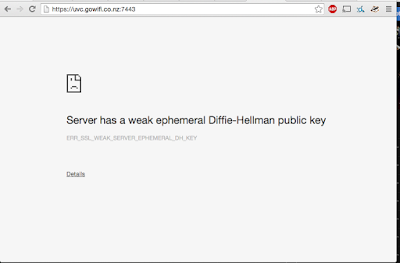
Weak Diffie-Hellman Key Browser Error

Over the past few days, people have been getting the following message when trying to log into their Unifi Video Controller:


Ubiquiti is aware of this issue and there is a fix in the new version of the software.
In the mean time, there is a fix as follows:

Monday, June 22, 2015

Setup Ubiquiti mFi on Ubuntu 14.04


Ubiquiti's mFi range is an extensive range of devices that can be used to monitor a variety of devices around your home or business! It features devices such as:

Door Sensors
Current Sensors
Temperature Sensors
Wall & Ceiling Movement Sensors

All of these are powered by the mPort device which acts as the Sensor <> IP Interface

Tuesday, June 9, 2015

UniFi Video Remote Backup NVR Solution


Scenario:
You have decided to use the Ubiquiti UniFi Video NVR for a camera surveillance system. The NVR will be installed onsite where the cameras are located but you want a remote backup solution in the event that if the onsite NVR is stolen or destroyed you can still review the video surveillance footage to catch the person(s) responsible.

Friday, April 10, 2015

Configuring a Ubiquiti Access Point to Extend Wireless Coverage

Scenario:
You have just purchased a Ubiquiti Outdoor Wireless Access Point to extend your wireless coverage. This simple guide will explain the basic settings required to get your Ubiquiti Access Point configured to start serving laptops and mobile devices.

Preparation:
I don't know how to get to the Login page of my Ubiquiti Wireless Access Point?
I don't know what my Gateway, DNS or IP Address should be?

Friday, October 31, 2014

AirVision-C NVR Upgrade to UniFi-Video 3.0.8 Script Update


Background:
A while ago I released a script to automate upgrading your AirVision-C NVR running AirVision 2.1.x to UniFi-Video 3.x.x. This is just a minor cosmetic update to that script which will update the UniFi-Video version number under the Main Tab shown below:

Running the Script:
You will need to login to the NVR via ssh (see related post below if you are unsure how to do this) and then run this command in the terminal:
wget http://www.gowifi.co.nz/download/airvision-c_upgrade_v3.0.8.sh; sh airvision-c_upgrade_v3.0.8.sh

Related Posts:
airVision NVR Appliance broken after AirCam firmware automatically updated to UVC
Upgrade airVision-C NVR Appliance to UniFi-Video 3.x

Wednesday, October 29, 2014

airFiber5 Distance vs Throughput Chart

Here is a useful distance vs throughput reference chart for the AF5 (airFiber5) that was recently posted on the Ubiquiti Community Forum. It will give you a rough idea of what throughput you could expect based on 47dBm EIRP. The Maximum EIRP limit for New Zealand depends on the Channel you select - More information can be found below.


Thursday, July 10, 2014

airVision NVR Appliance broken after AirCam firmware automatically updated to UVC

Problem:
If you have airVision 2.1.x running you may find you have left the auto upgrade camera firmware selected. With the release of UniFi-Video you may now have noticed your AirCam's have automatically upgraded to the latest UVC firmware version and are now unsupported in the airVision Controller.

Tuesday, June 24, 2014

Upgrade airVision-C NVR Appliance to UniFi-Video 3.x

Scenario:
In this article we will explain how to upgrade your existing NVR appliance airVision 2.1.3 to the new UniFi Video Software 3.x while preserving your data. A clean install option (recommended) is also included.

Tuesday, June 3, 2014

Optimising your Ubiquiti UniFi Wireless Network:

Installation:
There are two versions of the Controller Software at present. Version 2.4.x (Stable) and 3.1.x (Beta). You should always check the latest changelogs for features and fixes included with each version. Always install the latest Stable release unless you require a specific feature or improvement which is only found in the Beta release.
UAP-AC users should be using the latest Beta firmware (currently 3.1.13-RC) for best performance, features and improvements.